Injections1.1
Publisher Description
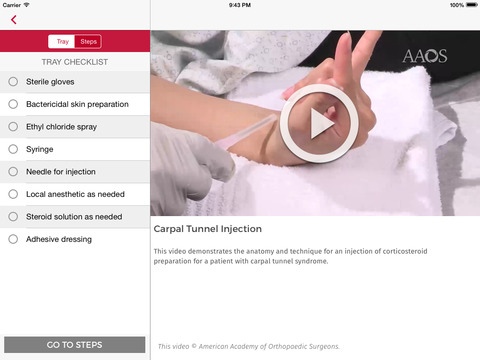
Injections and Aspirations of the Musculoskeletal System provides clear and concise direction on performing over 20 common medical procedures with stepwise guidance. Detailed, high-definition, videos with 2D overlays demonstrate safe needle placement and access to subcutaneous structures. A tray setup guide linked to each procedure ensures you have all necessary materials at the ready.
Contents:
Hand and Wrist
Trigger Finger Injection
Metacarpal Phalangeal Joint Injection
Carpal Metacarpal Joint Injection
Hematoma Block for a Distal Radius Fracture
Wrist Joint Injection and Aspiration Dorsal Approach
Carpal Tunnel Injection
De Quervain s Tenosynovitis Injection
Dorsal Wrist Ganglion Cyst Aspiration
Foot and Ankle
Morton s Neuroma Injection
Plantar Fasciitis and Prominent Heel Spur Injection
Ankle Joint Injection and Aspiration
Elbow
Elbow Joint Injection and Aspiration Lateral Approach
Elbow Joint Injection and Aspiration Posterior Approach
Lateral Epicondylitis Injection
Shoulder
Acromioclavicular Joint Injection
Subacromial Bursa Injection
Shoulder Joint Injection and Aspiration Posterior Approach
Hip and Knee
Greater Trochanteric Bursa Injection
Knee Joint Aspiration and Injection Lateral Approach
Knee Joint Aspiration and Injection Anterolateral Approach
Pes Anserine Bursa Injection
Brought to you by the American Academy of Orthopaedic Surgeons, the preeminent provider of musculoskeletal education to orthopaedic surgeons and the medical community.
Requires iOS 8.0 or later. Compatible with iPad.
About Injections
The company that develops Injections is American Academy of Orthopaedic Surgeons Mobile. The latest version released by its developer is 1.1.
To install Injections on your iOS device, just click the green Continue To App button above to start the installation process. The app is listed on our website since 2015-03-24 and was downloaded 7 times. We have already checked if the download link is safe, however for your own protection we recommend that you scan the downloaded app with your antivirus. Your antivirus may detect the Injections as malware if the download link is broken.
How to install Injections on your iOS device:
- Click on the Continue To App button on our website. This will redirect you to the App Store.
- Once the Injections is shown in the iTunes listing of your iOS device, you can start its download and installation. Tap on the GET button to the right of the app to start downloading it.
- If you are not logged-in the iOS appstore app, you'll be prompted for your your Apple ID and/or password.
- After Injections is downloaded, you'll see an INSTALL button to the right. Tap on it to start the actual installation of the iOS app.
- Once installation is finished you can tap on the OPEN button to start it. Its icon will also be added to your device home screen.
